I love citation software because I don’t love citations

By jazzmodeus on flickr

People are surprised when I tell them I’m interested in citation management software (I’m talking about librarians here; non-librarians just stare blankly when I tell them that). Am I really that passionate about these programs? Yes; I have a special fondness for Zotero, but I’ve also learned to love EndNote (in spite of its many quirks) through teaching it for the past couple of years, and I’ve been curious enough to spend time with RefWorks and Mendeley as well.

So do I really love citations that much? No. In fact, just the opposite. I have no love for the mechanics of the various citation styles, and I think it’s a waste of time for students and researchers to go through their reference lists and italicize the journal title and volume number but not the issue number (when using APA style). I think it’s a tragedy when a student (especially an undergraduate student) loses marks on an assignment for putting a comma after the journal title instead of a period. I love citation software because I don’t love doing citations by hand, and these programs can save people a lot of time and frustration by automatically formatting citations in just about any style imaginable.

Now don’t get me wrong, I think it’s essential that students are taught the principles behind citing; they absolutely need to learn why and when to cite. I just don’t think they should spend so much time on how to cite. I suppose it’s worthwhile to teach students that different citations styles exist, but even this isn’t critical for students who have no intention of ever publishing an academic paper (though they do need to know the name of the style they’re expected to use, so they can select it in the software).

I would actually go so far as to say that the use of citation software can discourage plagiarism in some cases. Imagine a first year undergrad working madly late at night on a paper that’s due the next day (I’m sure you’ve never known anyone like this, but use your imagination). He comes to the end of his writing and realizes he needs to cite his sources. He types up citations for all the direct quotations and other obvious passages. Struggling to keep his eyes open, he realizes there are additional sources he relied on heavily in his research, but he can’t quite remember where he copied down their details. Plus, he’s so tired that he will probably make errors in his reference list and lose marks. He hits print and falls asleep at his desk, without giving any credit to some of his sources.

Now imagine that same student, still working at the last minute, but this time he’s been using Zotero (or a similar program) throughout his research process. Each time he reads something relevant, he adds the citation information to his Zotero library (usually with just a single click). Now when it comes time to insert these citations into his paper in the wee hours of the morning, he makes a few quick clicks, and the word processor plugin does all the work for him. Of course, he needs to go through and make sure there are no errors (the software is certainly not perfect), but it saves him a lot of time and effort. And since it’s quick and easy, he cites all his sources, even the ones he might have been able to get away with omitting.

When first learning about citations, students often ask how to decide how many to include in their papers, to which most instructors reply, “when in doubt, cite.” I’m sure this occasionally leads to papers where every single sentence has a citation, but I think everyone would agree that it’s better to have a few superfluous citations than to have a few omitted. I say, let’s make this as easy as possible by using software for the heavy lifting.

So I love citation software because I don’t love forcing students to learn where to place their commas when they could be learning how to actually perform research. But this leads to another question: what would happen if every university instructor in the world agreed that students could just jot down the author, title, and publication year of each source they used, in any format? Would I still love citation software if its formatting function became unnecessary for undergraduates? I’ll admit this would make it less essential, but I think it would still be useful to help students keep track of their sources as they go through the research process. And of course the formatting function would still save time for graduate students and other researchers. So yes. I would continue to promote these programs to students, learn new ones as they are introduced, and blog about them.

What do you think? Am I crazy for loving software this much? Leave me a comment!
Top technology for students and new librarians to become familiar with

I recently attended the Ontario Library Association Super Conference, where I chatted with a ton of interesting people, including a group of student volunteers. One of these students later emailed me with a question I hadn’t put much thought into before: what types of technology should students (and new librarians) become familiar with? After sending her a list of suggestions, I decided I should share my thoughts on here as well. All the tools I’m mentioning are free (with a couple of exceptions I’ll point out) and easy to learn.

At the conference, I attended a session called Productivity in the Cloud: Evernote, Dropbox, & More, presented by Amanda Etches-Johnson, Charlotte Innerd, and David Fiander. These speakers covered a number of the things I would suggest people test out, including:

  • Doodle: This is an easy-to-use tool for scheduling meetings. I’ve used it numerous times in my professional work, usually for arranging committee meetings.
  • Skype: Great for conference calls (especially if you want to avoid paying for long distance). I’ve used this at work as well.
  • PBworks: I would definitely recommend that everyone learn how to create and edit a wiki, and PBworks is an excellent free tool. I’ve used it at work for sharing information with colleagues. A good real life example is the Library Day in the Life Project wiki.
  • Dropbox: I love being able to sync my folder and access files from my home computer, work computer, and iPad, plus anywhere with an internet connection through the web interface. Amanda says she even used the sharing function to collaborate with her co-author and editor when writing a book. I use it to keep track of my professional development and job applications.
  • Evernote: I’ve only been using Evernote for a little while now, but I can’t remember how I ever organized my life without it. It’s especially useful if you have a smartphone or tablet, but I think it’s still valuable even if you’re just using the desktop version. David says he has used it for house hunting (to keep track of realtor websites, info from his lawyer, photos of the houses, etc.) and at the bookstore when he sees a book he wants to remember to borrow from the library (he just takes a photo of the cover, and then can search by title or author later). The search function is excellent, even for text from images.
  • Google Docs: As Charlotte points out, Google Docs is all about sharing, even more so than Dropbox. If you want to be wowed, I would suggest you try the following: create a document, share it with someone, and then have that person start editing it on another computer, and you’ll be able to watch them make edits in real time. If you’ve ever collaborated with someone and ended up with a folder full of different versions of the same document (and perhaps even lost track of which is the newest version), you will love Google Docs.

Here are a few more suggestions I came up with:

  • Blogs: At the very least, you should be reading blogs on a regular basis (but I suppose I’m preaching to the choir by saying this on my blog). And if you’re reading blogs on a regular basis, you should set up an RSS feed reader – I love Google Reader, but there are plenty of good options available, either web-based or desktop-based. I’ve mentioned this many times before, but I would encourage all students (and professionals) to go one step further and start their own blog – it’s easy to do with a platform like WordPress or Blogger. Here’s an article I wrote as a student, explaining why students should blog: Why You Should Blog.
  • LinkedIn: As a future or current professional, you absolutely must have a profile on LinkedIn. When potential employers Google your name, you want them to find this and not your embarrassing Facebook photos. It also helps you keep in touch with classmates, colleagues, and people you’ll meet at conferences.
  • Twitter: Not as essential as LinkedIn, but you’ll probably want to get in on the conversation, or at the very least give it a try so you know what it means to “tweet.”
  • Social bookmarking: If you’re still saving all of your bookmarks in your browser, you should really consider a web-based option. The most popular site used to be Delicious, but they made some changes I didn’t like, so I’ve moved to Diigo. Once you’ve set up an account, try installing an extension for your browser to make it even easier to save sites for later.
  • Presentation software: The standard is PowerPoint (not free, but probably available at your school or work), so you’ll need to know how to use it well, especially when you’re collaborating. You don’t need to know about all the advanced functions, but you should be able to quickly create a simple, attractive presentation. In a pinch, you can open PowerPoint slides in OpenOffice.org (which is free), but a lot of the formatting will be lost, so I don’t recommend it as a long-term solution. A much more attractive free option is Prezi, which allows you to easily create visually interesting presentations. Edit: @adr points out that “Prezi is not indexable, not searchable, not plain text, and makes people seasick.” However, I like the fact that presentations are posted publicly online by default (even if they’re not indexable). Whether they make people seasick depends on how you create your transitions.
  • Citation management software: You should learn at least one of these programs. If your school or library gives you access to RefWorks or EndNote, go ahead and start there, but you should also check out Zotero, which is free, open source, and easy to learn. Make sure you learn how to get citations into your library, and then how to use the word processor plugin to automatically format a paper. Another popular free option is Mendeley, which has an integrated social network for researchers.
  • Screencasting software: This isn’t essential, but it’s sort of fun. Check to see whether your school or library gives you access to Camtasia or Adobe Captivate – if not, try Jing, which is a free alternative.

What else would you add to this list? Leave more suggestions in the comments.

Creating subject guides that students will use

I believe that subject guides are a potentially valuable but generally underused resource for academic libraries. As a student, my practicum project at the McGill Library involved conducting a focus group with students to learn what they thought about subject guide design. I asked them what they thought of the current design and had them offer suggestions for potential future designs. One of the most striking findings (from my admittedly small sample) was that almost none of them were aware that such resources existed, but most of them said they would find the guides useful for their work (they also had some criticisms of the layout being used at the time, which has since been improved). This study, along with anecdotal evidence from other insitutions, reinforced my suspicion that subject guides are somehow not quite connecting with students.

Later, as a newly minted liaison librarian, I relied heavily on subject guides in my work. While learning the ropes of the reference desk, I spent time between questions scouring the guides relevant to my subjects. I found this to be an incredibly useful way to discover the various resources my library had access to and how these resources could be used to research different subjects. When giving information literacy sessions in classes, the guides helped me choose which resources to recommend, and in almost every presentation I showed how to reach the appropriate subject guide, in the hopes that students would go there when researching their assignments. But no matter how much I promoted subject guides, students coming to the reference desk still seemed unaware of their existence.

Of course, there are some resources that only a librarian could love, and librarians sometimes foist these upon students because we believe they need them, without considering whether they will actually use them once they’ve left the reference desk. A good example would be old school Dialog-style search interfaces that require advanced search skills; some librarians still believe that we should train all students to use these databases so they can perform the most efficient searches possible. While some disciplines may require somewhat more structured searching, I think the typical undergraduate student will end up doing better research by learning to perform relatively simple searches in the appropriate modern databases, as they will be more likely to retain what they’ve learned and less likely to resort to plagiarism or a Google-only strategy. So is it possible that subject guides are great for librarians but not for students? Should we take them off our public websites altogether, and focus on other methods of getting the word out about resources, such as through information literacy sessions? Based on the interactions I’ve had with students, I still have hope for subject guides. Once they’re aware that the guides exist, students seem to appreciate being able to find all the best resources listed on a single page, and they usually indicate that they will use them in the future. So they still have potential, but there’s clearly work to be done to make them as usable and discoverable as possible.

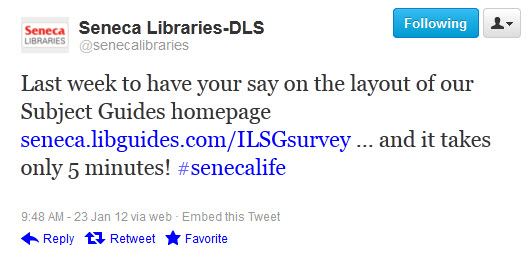
Other libraries seem to be struggling with the same issues, and I am always interested to learn how other institutions are attempting to connect their students with subject guides. Today I noticed the following tweet from the libraries at Seneca College in Toronto (@senecalibraries):


I thought this was a great way to solicit feedback from students while also reminding them that the subject guides are available. What do you think about subject guides? How can we make them live up to their potential? Or should we get rid of them altogether? Let me know in the comments.

The library, as described by the 1771 Encyclopædia Britannica

I was walking through the stacks on a rare quiet day (classes don’t start until next week), when I stumbled upon the 1771 Encyclopædia Britannica. I couldn’t resist looking up the entry for library:

an edifice or apartment destined for holding a considerable number of books placed regularly on shelves ; or , the books themselves lodged in it.

We can all agree that libraries have come a long way since being simply buildings full of books, but here’s the part that really had me rolling on the floor:

In Edinburgh there is a good library belonging to the university, well furnished with books ; which are kept in good order, and cloistered up with wire-doors, that none but the keeper can open, and are now lent out only upon consignation of the price ; a method much more commodious than the multitude of chains used in other libraries.

Still, I think this would be an appropriate tagline even today:

Libraries: disseminating information through the most commodious methods for centuries

Fun with Zotero: Scanning barcodes

I’m fascinated by citation management software. At work, I regularly teach students, faculty, and sometimes other librarians how to use EndNote, and I’ve given a couple of sessions on Zotero as well. Sometimes I doubt that the majority of information professionals share my passion, but a quick look at my blog stats tells me that my most popular blog post by far has been the one I wrote comparing EndNote and Zotero, so I must not be alone.

Both EndNote and Zotero have been improved tremendously since I wrote that post three years ago, and I try to keep up with the new features. One feature of Zotero I find particularly useful when dealing with print books is the ability to import an item by ISBN. By clicking the magic wand icon, you can enter the ISBN of a book, either by typing it in or by scanning the barcode, and Zotero will import the metadata from WorldCat. Now, this feature is actually not new, but there’s a new option for anyone who doesn’t have access to a library barcode scanner (or for when you’ve left yours at home). Scanner for Zotero is an Android app that allows you to scan a book’s barcode using the camera on your Android device and then sends the record straight to your Zotero library. The app costs $2 from the Android Market, but if you really don’t want to pay, you can download the code, which has an open source license, and then compile it yourself (personally, I was happy enough to pay the toonie).

Logo for the Scanner for Zotero app

I’ve been using the app for a few weeks now, so I thought I would share my thoughts. In general, I am quite impressed; it’s a simple app without any bells or whistles that only does one thing but does it very well. I hit a small snag when setting it up, but the developer responded promptly to my email and walked me through it (thanks, John!). Scanning a barcode is reasonably quick, though not as fast as the dedicated barcode scanner I have at work, and adding an item to your Zotero library is straightforward (the simple interface does not provide an option for saving an item to a collection within your library, but this hasn’t bothered me). One of the only options available is to choose whether to use WorldCat or Google Books to retrieve the metadata. As one would hope, the records are more or less the same regardless of the source; however, there are some slight differences. What surprised me the most was that there were differences between records imported using the magic wand (which makes use of WorldCat) and ones imported using the app when instructing it to use WorldCat. Here’s what I found when using the three different methods:

Magic wand (WorldCat):

  • Language field blank
  • No page numbers
  • Editors show up in Author field without any indication they are actually editors
  • Only the first author is listed

Scanner for Zotero with WorldCat:

  • Language appears correctly as three letter code: eng, fre, etc.
  • No page numbers
  • Editor shows up in Author field preceded by “Edited by”
  • Multiple authors or editors show up in a single Author field

Scanner for Zotero with Google Books:

  • Language appears correctly as two letter code: en, fr, etc.
  • Number of pages appears correctly
  • Editors show up in Author field without any indication they are actually editors
  • Multiple authors or editors show up in separate Author fields

Both Scanner for Zotero options clearly produce better metadata than the built-in magic wand, but each of the three has its own quirks, presumably due largely to quirks in the structure of WorldCat and Google Books. I would recommend the app to any Zotero user with an Android device. Even if you don’t have a stack of books you’ve been waiting to add to your Zotero library, it’s fun to be able to zap the barcode of anything with an ISBN. Surely if you’ve read all the way to the end of this post, you must agree with my definition of fun.

A new student reports on McGill’s MLIS program

I’ve already recommended Hack Library School, but today I want to point out a recent post on that blog. People often ask for my thoughts on McGill’s MLIS program, so this article may be of interest, especially to prospective students. As always, follow the link to read the full post.

From Back to the Beginning by Laura Sanders, AKA @laurainthelib:

Many students work part time through the year. However, because Montreal is a bilingual city, it can be tough to find work if you don’t speak French. That said, McGill has a Work Study program where you can find a job at one of the campus’ many libraries, and French is not required for these positions. Work Study is also a good option for international students, who may not be able to work off campus because of visa restrictions. (On that note, I should add that McGill’s program has a large number of American students. Although international tuition fees are higher than those paid by Quebec or Canadian students, they are still much lower than the tuition fees of many American library schools.)

On shooting for the moon

Michael Steeleworthy is a fantastic gentleman I was fortunate enough to meet at CLA in Halifax this year, and he recently offered some very good advice for recent grads based on his first year as a professional librarian, including:

  • Share your opinions with your employers and colleagues
    • You still have a lot to learn, and these people can help you along the way.  But more importantly, these people want to know your opinions, too.  You may be new and green, but to a lot of people, you represent vast potential because you can bring different and new ideas to the table.  You shouldn’t ever take over a meeting with your opinions and antics, but you should definitely speak up and be heard.  Remember: you won’t be hired to be a bump on a log, so make sure your contribute to your library and your team.

For the most part, I agree with all of his advice. Of course, he acknowledges that “nothing is ever 100% or complete in this world,” and I would slap a big YMMV sticker on the following:

  • Don’t shoot for the moon
    • Once you land a job, you may be so full of enthusiasm that you’ll want to tackle everything at once.  Don’t do this.  Prioritize what needs to be done against the library’s timelines, your schedule, and also against your own learning curve.  Taking on too much will burn you out and potentially let others down.  Instead, create a schedule with your supervisors or mentors, and return to it regularly to adjust it up or down.  This shows foresight: they’ll appreciate that you’re balancing your duties and also keeping them in the loop.

True, many (if not most) first library gigs involve an overwhelming workload. And yes, piling on projects until you risk burning out is a bad idea. But I would never discourage anyone from shooting for the moon – you just need to be realistic about it. Do you have a great idea you want to try out, but you’re not sure whether you have time for it? Talk to your supervisor, and see how you can fit it in. But by all means, prioritize, create schedules, and only take on what you can handle.

I think in additional to the workload of the position, another important variable is the personality of the individual. There are certainly some new librarians who are afraid to say no, and this can lead to burning out, so these people should avoid shooting for the moon. However, there are also librarians who avoid volunteering for additional projects because they want to focus on their core responsibilities. Sometimes this makes sense, but the additional projects can be the most interesting ones, and I would hate for anyone to miss out on enjoyable endeavours because they want to put 110% into their main duties. It’s okay to only put in 100%, and use the extra 10% elsewhere!

It may sound less catchy, but here’s my advice: shoot for the moon, but only after you have considered your situation and consulted with your supervisor.

Some sobering advice regarding library school expectations

I came across an interesting post from Mr. Library Dude, who offers his advice on the reality of library school and library job hunting. Although it comes across as somewhat pessimistic, I do agree with most of his points. For example, here’s #1:

Library school: if you have the time/money to find a school that “fits” you, then by all means. However, it’s completely OK to just pick the in-state/cheapest option. A library school is a library school is a library school.

I usually wouldn’t put it that bluntly, but it’s a fair point. People often ask me whether I think McGill offers a “good” MLIS program, and truthfully I don’t believe there is a significant variation in quality among schools (at least in Canada). If one program offers a certain specialization that others lack, feel free to choose accordingly, but at the end of the day, when it comes to finding a job, what matters is that you’ve (a) received the degree, and (b) accumulated some work experience along the way.

The only point I completely disagree with is #2:

If you have not worked in a library before attending  library school, why are you making such as a large financial commitment for a career that you have no experience in? A “love” of books and “I like to read” won’t cut it.

I don’t believe that anyone who has done some research and decided to become a librarian should feel they must first job hunt for a library assistant position and then work in it for a year before applying to library school. Certainly, a love of books and reading doesn’t necessarily mean you will enjoy a career as a librarian, but if you put in the research and talk to some people in the field, you can make the decision with no previous experience. The important thing is having library experience on your CV before you graduate, but you can acquire this during your studies.

I will also comment on the final point:

Don’t blame library school if you cannot find a professional job. You are an information professional. Did you not research the state of the job market?

I hope no one believes that earning an MLIS is the most challenging part of starting a library career; on graduation day, there will be no line-up of employers begging you to work for them. This is not your school’s fault. It is simply the way the job market works (as is the case with most careers). But I also hope no one is discouraged from starting an MLIS because of what they’ve heard about the library job market. As long as you’re willing to put in the extra effort (and often patience), you will find an appropriate job eventually.

In fact, many of Mr. Dude’s points are the same ones I’ve made before (don’t neglect to read the comments on his post for even more tips). Gain experience while studying, find a mentor, and don’t be shy about marketing yourself.

Learn more about programs from Hack Library School

Every now and then, someone contacts me to ask what I think about the library program at McGill. I’m always happy to share what I can, but it’s a tough question; I’ve never been in an LIS program anywhere else, so how do I know how McGill compares?

If you’re looking for a variety of perspectives on various programs, I suggest you check out Hack Library School. They have a series of posts called Hack Your Program, where students provide both facts and commentary about the programs they attend. The majority of the programs are in the United States, though the latest one is from Israel.

Of course, there’s more to HLS than just Hack Your Program; much like the ILSS, the blog covers a variety of topics of interest to library school students (e.g., getting involved with student organizations, which continues to be a surprisingly tough sell). And if you’re a student looking to become more involved with the community, here’s your chance:

HackLibSchool is seeking more contributors. We need students who are new to LIS programs! We need museum studies and archivist students! We need students that represent the diversity of the field! Where are you all??

What are you waiting for? Go join in!

Learn from successful (and generous) library folk with Open Cover Letters

For the past few days, the biblioblogosphere has been buzzing with news of a new resource for library job seekers. I first heard about it on the Re:Generations blog, but others blogs I follow have mentioned it as well. The site is called Open Cover Letters, and the idea is simple. Librarians and archivists send in the cover letters that landed them interviews in the field, and the letters are posted, with identifying information removed, on the website.

I remember writing my first cover letters for professional library positions – it was terrifying! How long should it be? What kind of language should I use? And the worst part was that people kept answering these questions with “it depends.” And of course that’s the only appropriate answer anyone can give, so it makes a lot of sense to look through some real life examples. Even if you’re not applying for exactly the positions that these cover letters are for, you can learn a lot about style and content by reading through a few. I highly recommend it to anyone who will be writing a cover letter in the reasonably near future.